
Persistent Memory for Claude Managed Agents: What I Found After Three Days of Building
A hands-on review of Anthropic's persistent memory for Claude Managed Agents, including three sessions, one real failure, and the audit trail that recovered it.

What I was trying to figure out
A few weeks ago, Anthropic shipped something I’d been waiting for: persistent memory stores for Claude Managed Agents. The pitch is that you get a versioned, FUSE-mounted file directory that an agent can read and write across sessions, so even when the session container is destroyed, the memory persists and is available the next time you start a session.
That sounded promising on paper, but I wanted to know what it actually feels like to use, what it costs, where it breaks, and whether the platform actually saves you when something goes wrong (because something always does in real systems).
So I spent a few days building with it: one agent, one persistent memory store, three sessions, a small inspector CLI, five charts, and about $0.40 in total API spend. Somewhere in the middle of all that, the agent destroyed almost 6KB of carefully-written notes in a single tool call, which turned out to be the most honest finding of the entire review and is where I want to start.
The platform’s immutable versioning let me recover the file byte-for-byte, with full attribution of which session caused the damage. Cross-session memory works as advertised, agents will sometimes get it wrong even when they’re trying to do the right thing, and the audit trail is the kind of feature you don’t really appreciate until you need it. Let me walk through how I got there.
The four building blocks
Before we go any further, you need to understand the four building blocks Managed Agents is built on, because the architecture only really makes sense once you can keep them straight.
Agent. A persisted, versioned config that holds your model selection, system prompt, tools, MCP servers, and skills. You create one and reuse it forever, and updating an agent produces a new immutable version that existing sessions can pin to. Agents are always permanent until you archive them, which means there’s no ephemeral mode.
Environment. A template for the sandbox container an agent’s tools execute in. Persistent and reusable across agents, much like a Dockerfile that you point lots of services at.
Session. A single run of an agent inside an environment, where the live action happens. You send messages and stream events back, and sessions are transient by design, so the container dies when the session ends.
Memory store. A workspace-scoped, persistent file directory you can mount into a session, which survives across sessions and records every write with full audit metadata. The agent reads and writes through normal file tools rather than through some special “memory tool,” so it’s just files in a folder.
The architectural beat that took me longest to internalize is that agents and memory stores are independent resources: the agent has no memory_store field, the memory store has no agent field, and the two get glued together at session creation time, like this:
session = client.beta.sessions.create(
    agent=AGENT_ID,
    environment_id=ENV_ID,
    resources=[
        {"type": "memory_store", "memory_store_id": STORE_ID, "access": "read_write"}
    ],
)
A few things worth sitting with before we move on. The first is that memory in this system is just files, with no vector embeddings, no semantic search, and no automatic summarization happening behind the scenes; the agent uses read, write, edit, glob, grep, and bash exactly the way it would on any other filesystem. The second is that you’re paying for the harness around the model rather than the model itself: container provisioning, the event stream, the FUSE-mounted memory, immutable versioning, and the audit trail are what you’re actually getting, and if you don’t need that harness, the regular Messages API is the right tool for the job.
Setting things up
There’s a clean way to work with Managed Agents that’s worth doing right from the start, which is splitting your project into a control plane (the persistent resources) and a data plane (the runtime code). Anthropic’s docs recommend this split, and after a few hours of building you’ll see why they matter.
The control plane is where your agents, environments, and memory stores live as static configs. You define them as YAML, version them in git like any other infrastructure, and apply them with Anthropic’s CLI by running something like ant beta:agents create < my-agent.yaml. The CLI returns a stable resource ID, which is what your runtime code references for the lifetime of that resource.
The data plane is everything dynamic and per-task: sessions, events, memory operations, and anything else that happens during an actual run. This is where your application code lives, loading the resource IDs from .env, calling client.beta.sessions.create(...) with whatever parameters the current task needs, and streaming events back as the agent works.
The researcher agent itself is small enough to fit in a single YAML block:
name: researcher
model: claude-sonnet-4-6
system: |
  You are a careful, persistent research assistant.
  You have a research notebook mounted at /mnt/memory/research-notes/. Use it
  freely to store anything worth remembering across sessions. Organize the
  directory however makes sense to you.

  Some habits to keep:
  - Before researching a topic, check if you've already taken notes on it.
  - When you learn something new, write it down.
  - When updating an existing note, prefer surgical edits over full rewrites.
  - Cite sources for any factual claims.
tools:
  - type: agent_toolset_20260401
A few choices in there are worth flagging. I went with Sonnet 4.6 over Opus because it’s about three times cheaper and more than capable for this kind of work, and the prebuilt agent_toolset_20260401 gives the agent bash, read, write, edit, glob, grep, web_search, and web_fetch, all of which execute server-side in the session container without me having to implement any of them. I deliberately gave the agent very little guidance on how to organize its memory directory, because I wanted to see what it would do unprompted.
The single most important line in that prompt is the first habit, “Before researching a topic, check if you’ve already taken notes on it.” Without it, cross-session memory remains theoretical, but with it the habit fires reliably and memory turns into something the agent actually uses rather than a feature it has access to but never reaches for.
The runtime script comes out to about 130 lines, most of which is event-stream handling. The substantive piece is mounting the memory store via the session’s resources array (shown above) and then opening the event stream before sending the kickoff message, because stream-first ordering matters here: events buffered before you connect arrive in a single batch instead of streaming in real-time.
With all that in place, I ran three sessions against the same memory store, and those three sessions are the spine of this review.
Three sessions
Session 1: writing notes from scratch
research_session.py "research CRDTs (Conflict-free Replicated Data Types) and take notes. Focus on what they are, the main families, and a few concrete examples. Cite sources."
What I wanted to see was what the agent would do if I gave it total freedom to organize its memory directory. Would it create folders? Topic subdirectories? One flat file? A nested hierarchy with cross-references?
The agent’s first action was a bash command running rg against /mnt/memory/ to grep for prior notes, which means the “check first” instruction in the system prompt fired correctly even though there was nothing to find on this first run. It then issued two parallel web_search calls (which both returned content: [], more on that quirk later), composed comprehensively from training-data knowledge instead, and wrote a single 7,285-byte file to /crdts.md with a flat, well-organized markdown structure rather than a folder hierarchy.
The detail that surprised me most was the discovery aid the agent added without being asked: the very first line under the title was *keywords: CRDT, conflict-free, replicated, distributed, state-based, operation-based, CvRDT, CmRDT*, which the agent had clearly written for its future self to grep against. Nobody told it to write keyword tags, and it chose to do so on its own, which is the kind of thing that made me think Sonnet 4.6 has actual instincts about how file-based memory works.
This first session cost about $0.21.
Session 2: recall
research_session.py "What do you know about CRDTs? Specifically the difference between state-based and operation-based, and a couple concrete examples."
The prompt for this one deliberately doesn’t mention memory, because I wanted to see whether the “check first” habit would fire unprompted, with the trigger being the agent’s own internal sense of “you have notes, you should know to look.”
It did, and the result was almost too clean: the first action was the same bash/rg over the memory directory, which found /crdts.md, and the agent then said “I have solid notes on this” and answered the question by synthesizing from its own past notes without running a single new web search or composing anything from scratch.
After the session ended, I ran the inspector against the store and found that the version history of /crdts.md still showed exactly one version, attributed to Session 1’s ID. Session 2’s session ID does not appear anywhere in the audit log, because Session 2 only read from the store and never wrote to it. That’s the falsifiable claim, made falsifiable: reads do not create memory versions.
The cost worked out to about $0.04, which is roughly five times cheaper than Session 1 and demonstrates pretty clearly that memory turns one expensive session into many cheap ones:
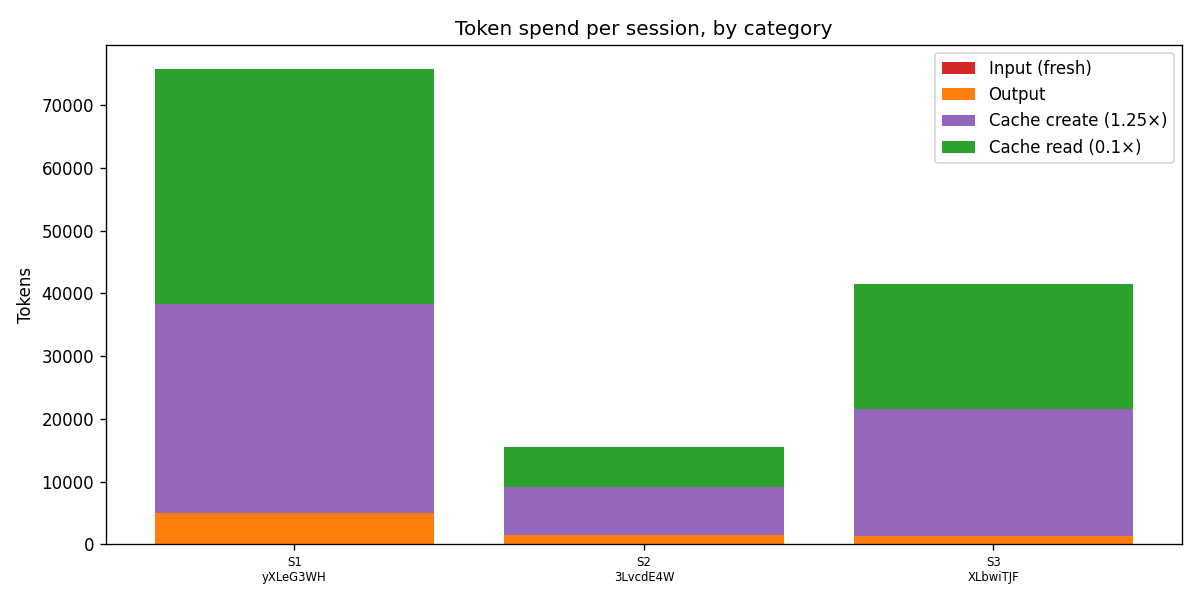
If you’re worried about the cost of using memory at scale, this matters: persistent memory is a feature rather than a tax, because the agent reads its own notes and skips the work it already did instead of recomputing everything from scratch every time.
Session 3: modify
research_session.py "Update your CRDT notes. Add a note about RGA (Replicated Growable Array)..."
This was supposed to be the cleanest of the three sessions, a small, surgical edit producing a second version of /crdts.mdwith an operation: modified entry in the audit log, and that’s not what happened.
Where this got interesting
The actual sequence of events from Session 3 is worth walking through layer by layer, because the failure mode is more interesting than a single bug.
Layer 1: the model wrote a buggy bash command
The agent’s check-first command was the following:
rg -i 'crdt\\\\|sequence\\\\|rga\\\\|replicated growable' /mnt/memory/research-notes/ -l
The \\\\| in that regex was meant as escaped pipes for ripgrep’s regex alternation, but bash interprets \\\\| as \\|, and ripgrep treats that as a literal | character rather than as a meta-character. So the search was actually looking for the literal string crdt\\|sequence\\|rga\\|replicated growable, which would never match anything in any actual file. Ripgrep returned no matches and exited with a non-zero status code, which is the correct behavior for “I found nothing.”
The model’s shell escaping is right almost every time, but the cases where it isn’t tend to be subtle, and this one happened to be load-bearing.
Layer 2: the platform correctly flagged the failure
The harness ran the command and produced a tool_result event with is_error: true and (no output) as the content, which is exactly what should have happened given that the command exited non-zero. The platform did its job here and explicitly told the agent loop that the command had failed.
Layer 3: the model ignored the error flag
The agent’s next message after that error result was, “The memory store is empty, no prior CRDT notes.” That statement was false, because /crdts.md had been sitting in the store for two days at that point, but the agent treated the empty output from the failed command as a meaningful answer rather than as a failure signal that needed re-investigation.
This is the most interesting failure layer to me, because the platform got it right and the model got it wrong. Defense in depth is a useful framing for what’s happening: even when the audit trail and error flags are working as designed, the model’s reasoning about its own tool outputs is the layer that has to hold, and that layer is reasoning rather than infrastructure.
Layer 4: the destructive action
Believing the store was empty, the agent called write rather than edit, generating a fresh ~1,500-byte RGA-only file from scratch and writing it directly to /crdts.md. The original 7,285-byte file with all of the careful notes from Session 1 was overwritten in a single operation.
I didn’t even notice this had happened until I ran the inspector, because from the script’s perspective Session 3 looked like a normal run; the agent reported back that it had updated the notes and cited the RGA paper, kindly and unintentionally lying because the underlying belief was wrong.
What the audit log showed
Running inspector log /crdts.md after Session 3 surfaced two versions:
version  memver_0169b…  modified  session_actor (Session 3)   1509 bytes
version  memver_01A7Z…  created   session_actor (Session 1)   7285 bytes
The size dropping from 7,285 bytes to 1,509 bytes is the catastrophe made visible, but the more important fact is that the original is still here, addressable by ID and retrievable in full content via the API, even though the head of the file is now the smaller broken version.
The diff between the two versions, generated by the inspector’s diff subcommand, made the loss concrete:
--- memver_01A7Z… (/crdts.md, 7285B, created)
+++ memver_0169b… (/crdts.md, 1509B, modified)
@@ -1,122 +1,21 @@
-# CRDTs: Conflict-free Replicated Data Types
-*keywords: CRDT, conflict-free, replicated, ...*
-## What They Are
-CRDTs are data structures designed to be replicated across multiple nodes...
-(... 121 more deletion lines ...)
+# CRDT Research Notes
+## Sequences / Text CRDTs
+### RGA (Replicated Growable Array)
About 5,800 bytes of careful work disappeared in a single agent action that thought it was creating a brand-new file from scratch, including the state-based versus operation-based section, the G-Counter and OR-Set examples, the math foundation, and the entire sources block at the bottom.
How I got it back
This is the moment that, on a flat filesystem with no versioning, would have been the end of the story. Without the platform’s audit log, the original content would simply be gone; it wasn’t, because the audit log was holding the original verbatim.
I added a restore subcommand to the inspector that fetches a chosen historical version’s content and writes it back as the new head via memory_stores.memories.update(memory_id, content=old_content). Anthropic’s API records that update as a new version rather than overwriting history, which means the recovery itself becomes part of the audit trail.
After running the restore, inspector log /crdts.md showed three versions, and the entire arc was right there in the output:
memver_01EKK…  modified  api_actor (apikey_…)         7285 B   sha 3f3ec0d2…  ← matches v1
memver_0169b…  modified  session_actor (Session 3)    1509 B   sha 7356ce60…  ← catastrophe
memver_01A7Z…  created   session_actor (Session 1)    7285 B   sha 3f3ec0d2…  ← original
A few details in that output are worth more than they look at first glance. The platform distinguishes operator-side mutations (recorded as api_actor with an apikey_ ID) from agent-side ones (recorded as session_actor with a sesn_ID), which makes “who did this” forensics actually possible rather than something you’d have to retrofit yourself. The SHA-256 hash on the restored version matches the original exactly, so the recovery is byte-identical and verifiable rather than approximately right. And the catastrophe (v2) stays in the audit log forever, because recovery doesn’t erase the record; if you wanted v2’s content out of the log entirely, you’d use the redact endpoint, which clears the content while preserving all of the metadata.
The same story renders cleanly as a chart:
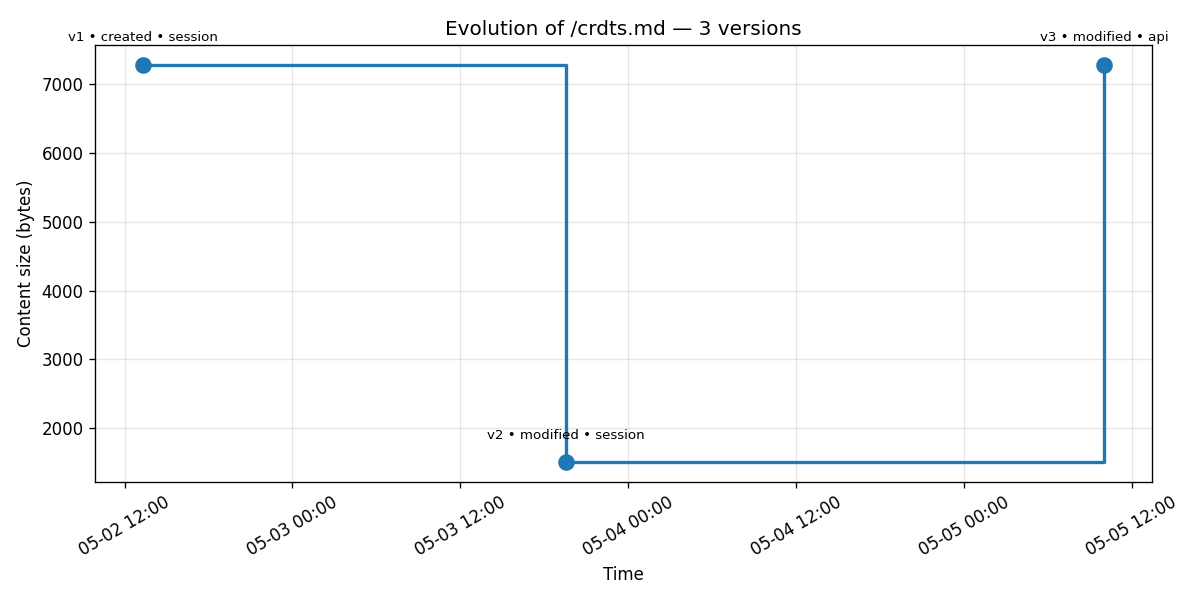
The cliff and the recovery are immediately legible: 7,285 bytes, plunge to 1,509, return to 7,285, all in three points and one chart that captures the full narrative.
This is the section of the post I’d stake my credibility on. Cross-session memory works, agents will sometimes get it wrong, and the platform’s audit trail is the thing that saves you when they do.
Important Considerations
Building with Managed Agents memory turned up more rough edges than I expected, none of which are dealbreakers but all of which are worth knowing about before you commit to the platform.
Resource IDs need to be persisted yourself. Every call to
agents.create(),environments.create(), ormemory_stores.create()returns an opaque ID that your runtime code has to look up later, which is standard cloud-API ceremony but missing some of the friction-reducers other platforms have shipped: agent and environment names aren’t unique within an account, there’s no idempotentcreate_or_update, and there’s no Terraform provider yet, so you end up doing the capture-and-paste-into-.envdance manually.Memory store
descriptionmust be single-line. The API rejects any control character, including newlines, with a cryptic regex error, which is inconsistent with agent system prompts that are explicitly multi-line up to 100K chars. It’s easy to fix once you know about it.Memory paths are store-relative rather than mount-relative. When the agent writes to
/mnt/memory/research-notes/crdts.mdinside the container, the API stores the file at/crdts.mdand treats the mount-path prefix as a runtime detail, so when you list or retrieve memories host-side you reference the relative path rather than the full container path.Web search results are hidden from the event stream. When the agent runs
web_search, the resultingagent.tool_result.contentfield is an empty array even when the search clearly succeeded (the agent uses the results downstream to give a correct answer). The model gets the actual search content internally, but the public event surface gets a sanitized empty array, which is almost certainly intentional for IP and copyright reasons but means you cannot log “what URLs the agent consulted” without asking the agent to cite them in its outputs.Agent-generated
bashinvocations aren’t always well-formed. The escaping bug that triggered Session 3’s catastrophe is one example, and defensive system-prompt phrasing helps but doesn’t eliminate the problem entirely.memory_versions.retrieve(version_id, ...)takes the version ID positionally only. Calling it asretrieve(version_id=...)raisesTypeError, even thoughmemories.retrieve(memory_id=..., ...)accepts the keyword form, which is an inconsistency within the same SDK namespace.The streaming method lives at
client.beta.sessions.events.stream(...), notclient.beta.sessions.stream(...)as some doc snippets imply. The latter form doesn’t exist and will fail at runtime.Print buffering kills real-time observability. When you run a Python session script in the background or through subprocess, Python buffers stdout, so the script appears to do nothing for minutes and then dumps everything when the agent finishes. The fix is either passing
flush=Trueto print or running the script underpython -u.Subscription auth doesn’t apply to Managed Agents. API key authentication with per-token billing is the only path, so a Claude Pro or Max subscription doesn’t help you here even though it works for Claude Code.
So when does this make sense?
Managed Agents is a deliberately persistent, server-managed harness, so the right question to ask isn’t “is it good?” but “is the persistent harness shape what my problem actually wants?”
Use caseReach for…One-shot Claude call (classify, extract, summarize)Messages APIMulti-turn conversation, your code holds the stateMessages APIMulti-step pipeline you orchestrate yourselfMessages API + tool usePersistent agent reused across sessions/users with managed sandboxManaged AgentsLong-running task with memory across sessionsManaged Agents + memory storeAnything requiring a non-Claude modelRoll your own
A useful rule of thumb is that if your code calls agents.create() more than once for the “same” agent, you’re using the wrong tool. Agents are persistent, versioned configs that you create once and reference forever, so treating Managed Agents like a fancy Messages API and creating agents per request is fighting the platform’s whole design.
Now, what about cost? Across all three sessions plus a smoke-test, my total API spend came out to about $0.37, which includes a substantial 7KB notes write, a recall session that exercised the cache heavily, a destructive overwrite, and an operator-side restore.
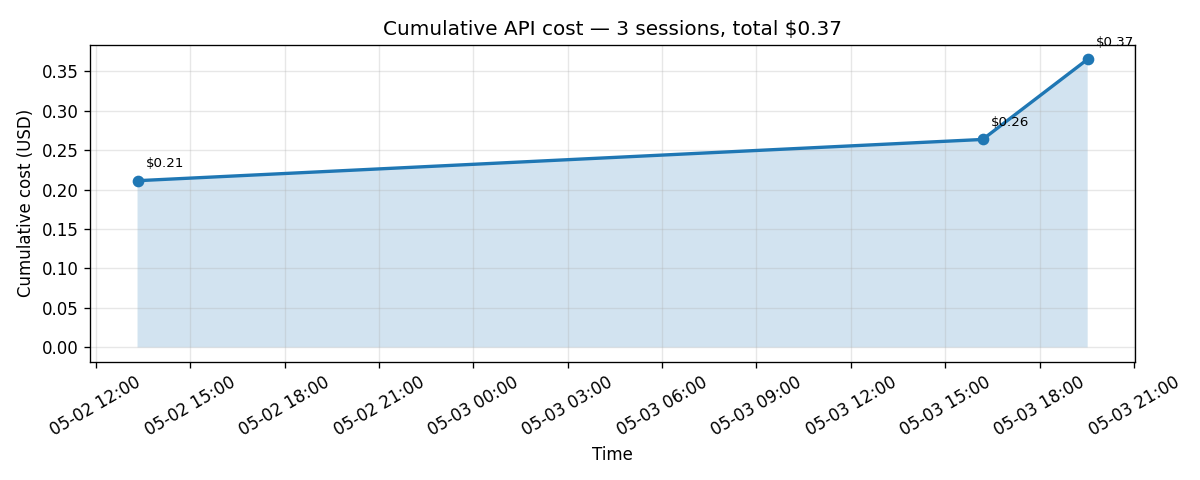
Memory store doesn’t measurably move the cost needle, because the agent loop and the model itself are where the spend lives. Sonnet 4.6 with aggressive caching is genuinely affordable for any individual or small team use case, and the platform handles caching for you without any configuration.
What I didn’t get to (yet)
A few features deserve more than a passing mention but didn’t fit the failure-recovery spine of this post:
Multi-store sessions and the multi-tenant pattern. A session can mount up to eight memory stores at once, and the natural pattern for a SaaS-shaped application is one shared read-only “house knowledge” store plus one read-write per-user store, with the agent definition the same for everyone. Access modes are enforced at the FUSE filesystem level, so
read_onlyis real OS-level enforcement rather than a polite request from the model. This is big enough that I’m planning to cover it in its own follow-up post.Optimistic concurrency via preconditions. The
updateendpoint accepts aprecondition: {type: "content_sha256", ...}field, and if the file’s current SHA doesn’t match the one you supplied, the API returns a 409 conflict. This is exactly the safety net Session 3’s agent didn’t use and the kind of thing that should probably be standard practice for any read-modify-write flow.Redaction. The
memory_versions.redact(version_id)endpoint clears a historical version’s content while preserving all of the metadata around it, which is useful when a bad version contained PII or leaked secrets and you want them out of the audit log without losing the record that something existed there.MCP server integration. An agent can declare MCP servers (GitHub, Linear, Notion, and others), the session attaches a vault containing the credentials, and authentication is auto-refreshed by the platform. Pairing memory store with MCP, like a research agent that pulls from your Notion and writes findings to persistent memory, is one of the strongest use cases I can imagine for the platform overall.
So... should you use this?
If you’re sitting on the fence about whether to use Managed Agents memory, the answer is yes, with eyes open. The platform is real, the harness around the model is genuinely valuable, and the audit trail is the kind of feature you don’t appreciate until you need it, which in my case happened on the third session of the third day of building.
A few practical takeaways for anyone planning to build on this. Use preconditions whenever you can, especially for any flow that does a read-modify-write on the same memory file, because they’re the safety net that Session 3’s agent didn’t have. Build a small amount of host-side observability tooling, because even a 200-line inspector script is enough to catch problems your agent won’t tell you about. And know which side of the decision rubric your use case falls on before you commit, because Managed Agents is a great tool for the right shape of problem and the wrong tool for one-shot calls or anything that doesn’t benefit from persistence.
What do you think? Have you tried building with this yet? I’d love to hear what your experience has been.
Full code from the demo (agent YAMLs, runtime scripts, inspector CLI, monitoring charts) is at https://github.com/taylor-ortiz/claude-memory-managed-agents/blob/main/README.md.