

Staying current on AI research is one of those things that sounds simple until you actually try to do it consistently. arXiv publishes hundreds of machine learning papers every single day.
As someone who leads AI and Data at a technology company, I need to stay aware of what’s happening in research. While we don’t intend to implement every new pattern and concept, the ideas showing up in research today inspire the tools and techniques we’re evaluating and implementing for our own AI capabilities. Keeping up with emerging patterns ensures that we operate at an innovative and scalable level.
The problem is that reading even the abstracts of 300+ papers a day is not realistic. So I went through a few iterations of trying to solve this:
Iteration 1: Manually browsing arXiv on weekends, skimming titles and saving papers to read later
Pain point: I was always a week behind and the “read later” list just kept growing
Iteration 2: Subscribing to AI newsletters and following researchers on X
Pain point: Too broad, too noisy, and someone else was deciding what was relevant to me
Iteration 3: Using ChatGPT to ask “what are the most important ML papers from this week?”
Pain point: Hallucinated paper titles, no way to verify, and it didn’t know my specific interests
[We are here] Iteration 4: Build an automated pipeline that fetches papers from arXiv, uses Claude to score them against my specific interests, summarizes the top ones in plain language, and delivers them to my Kindle every morning before I wake up
Total cost: about $5/month. Total daily effort: zero.
Here is exactly how I built it.
The Architecture
The core insight here is that this is a filtering problem, not a summarization problem. arXiv gives you everything. Your job is to throw away 97% of it intelligently.
The pipeline looks like this:
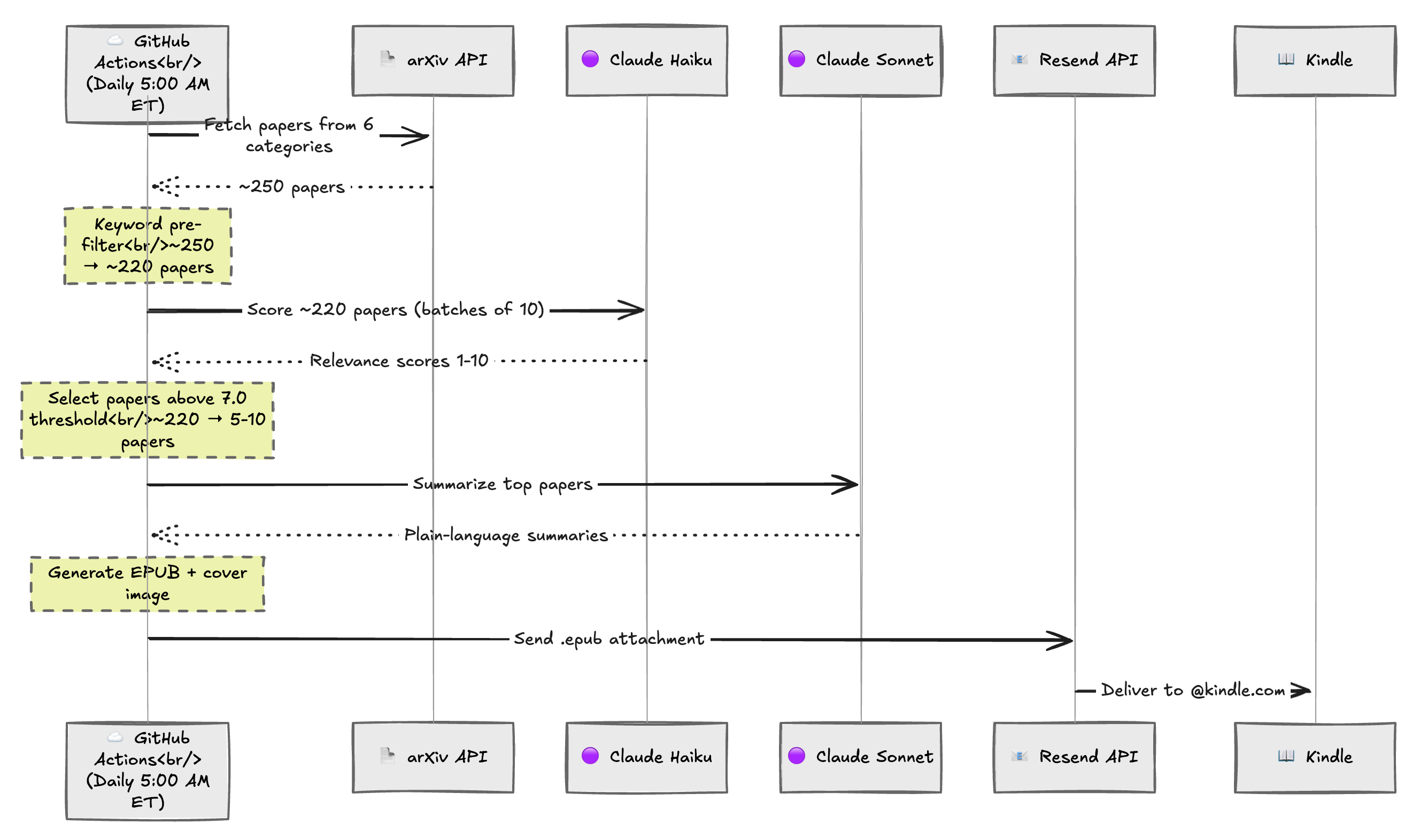
Let’s walk through each stage.
Stage 1: Fetch Everything
The pipeline starts by querying the arXiv API for papers submitted in the last day across six categories:
cs.AI(Artificial Intelligence)cs.LG(Machine Learning)cs.CL(Computation and Language / NLP)cs.CV(Computer Vision)cs.IR(Information Retrieval)stat.ML(Statistics: Machine Learning)
This typically yields 200-400 papers per day. I use the arxiv Python package which handles pagination and rate limiting. I also use a 2-day lookback window because arXiv publishes new papers around 8pm UTC, so a strict 1-day window can miss things depending on timing.
The fetcher deduplicates cross-listed papers so a paper listed under both cs.AI and cs.LG only appears once.
client = arxiv.Client(
    page_size=100,
    delay_seconds=3.0,
    num_retries=3,
)
search = arxiv.Search(
    query=query,
    max_results=total_max,
    sort_by=arxiv.SortCriterion.SubmittedDate,
    sort_order=arxiv.SortOrder.Descending,
)
Stage 2: Cheap Keyword Pre-Filter
Before making any API calls to Claude, I cut the candidate pool roughly in half with a simple keyword filter. If a paper’s title or abstract doesn’t mention any of about 35 terms I care about (”LLM”, “transformer”, “agent”, “RAG”, “fine-tuning”, “production”, “deployment”, etc.), it’s probably not relevant enough to spend tokens on.
This is intentionally broad. I would rather send a borderline paper to the LLM for scoring than accidentally filter out something good. The keyword list is just there to remove the obvious misses like pure math proofs or biology applications.
Typical result: 250 papers down to about 220 after keyword filter.
def _matches_keywords(paper: Paper, keywords_lower: list[str]) -> bool:
    text = f"{paper.title} {paper.abstract}".lower()
    return any(kw in text for kw in keywords_lower)
Simple. Effective. Costs nothing.
Stage 3: LLM Relevance Scoring with Claude Haiku
This is the most important stage. I send the remaining papers to Claude Haiku in batches of 10, along with my interest profile, and ask it to score each one from 1-10.
The interest profile is a plain-English description organized into priority tiers:
Tier 1 (score 8-10): LLMs, agents, RAG, prompt engineering
Tier 2 (score 6-8): Production ML systems, MLOps, data engineering
Tier 3 (score 4-6): Computer vision, recommendation systems
Tier 4 (score 1-3): Pure theory, narrow domain-specific stuff
I also include scoring modifiers. Papers with real production deployments get a +1 bonus. Papers that are purely benchmark-focused with no novel insight get a -2 penalty. Papers from major labs on Tier 1 topics get a small bump.
Along with each score, Haiku generates a one-line “hook” explaining why the paper matters. I specifically prompt it to write like it’s explaining to a smart colleague over coffee, not like an academic abstract.
Why Haiku for scoring? It’s cheap and fast. Scoring is a simpler classification task, not a nuanced generation task. At about $0.02-0.05 for all 220 papers, it’s practically free.
The Scoring Problem I Had to Fix
This is worth calling out because it took real iteration to get right. My first version of the scoring prompt produced useless results. Every paper scored between 8.0 and 8.5. Claude was being too generous and clustering everything at the top.
57% of papers were coming back above the threshold. That is not filtering. That is just passing everything through with extra steps.
I had to explicitly tell the model to use the full 1-10 range, include calibration examples in the prompt, and demand decimal scores (7.5, 6.0, 4.5) to create separation between papers. Here is what part of that prompt looks like:
CRITICAL INSTRUCTIONS FOR SCORING:
1. USE THE FULL RANGE of 1-10. Do NOT cluster scores.
2. A score of 9-10 should be RARE - only 0-1 per batch of 10.
3. Most papers should score between 3-7. That's normal and correct.
4. Use decimal scores (e.g., 7.5, 6.0, 4.5) to create separation.

Calibration examples:
- "New RLHF technique that improves LLM alignment with 40% less data" -> 9.0
- "Survey of prompt engineering techniques" -> 7.5
- "Improved object detection on COCO benchmark by 0.3 mAP" -> 3.0
- "Theoretical bounds on convergence of SGD" -> 2.5
After this rewrite, the scores spread out properly and I started getting 5-10 papers above threshold instead of 120+.
Stage 4: Select the Top Papers
I take everything scoring 7.0 or above and keep the top 10. If nothing meets the threshold (rare, but possible on light days), the pipeline automatically lowers it by 1.0 and tries again so I don’t get empty digests.
Typical result: 220 scored papers down to 5-10 selected.
Stage 5: Deep Summarization with Claude Sonnet
Now I switch to Claude Sonnet for the expensive, high-quality work. Each selected paper gets its own API call with the full abstract and a detailed summarization prompt.
The prompt is designed for a senior AI leader, not an academic. Here is what I mean by that:
If the paper uses jargon like “contrastive loss” or “OOD generalization,” the summary explains it in parentheses
It leads with what the paper does and why it matters, not the methodology
The “practical implications” section is specific: could this be used in production today? Is it research-only?
Sentences are short and punchy. No filler.
Each summary includes:
Key takeaways (2-3 bullet points)
Summary paragraph (3-5 sentences)
What’s novel (why this is different from existing work)
Practical implications (who benefits and how)
Why Sonnet for summaries? Summarization requires nuance. You need the model to truly understand a paper and translate it, not just classify it. The quality difference over Haiku is worth it when you’re only processing 5-10 papers.
This is the same two-model pattern I’ve seen work well in other contexts. Use the cheap model for high-volume classification. Use the expensive model for low-volume generation where quality matters.
Stage 6: Generate a Kindle-Friendly EPUB
The summaries get packaged into an EPUB ebook using Python’s ebooklib. The structure is optimized for how I actually read on a Kindle.
Overview chapter with a quick-scan table:
Date and pipeline statistics (”Fetched 247 papers, Pre-filtered to 224, Scored, Top 7 included”)
Rank, title, score, and the one-line hook for each paper
Individual paper chapters with a tiered layout:
At a Glance: title, authors, categories, relevance score, hook, key takeaway bullets
Deep Dive: full summary, what’s novel, practical implications
Link to the full PDF on arXiv
The EPUB gets a generated cover image using Pillow with the date and paper count, which shows up as the thumbnail in the Kindle library. I bundled the Inter font so it renders correctly both on my Mac locally and on GitHub Actions (which runs Linux and doesn’t have macOS system fonts).
Stage 7: Email to Kindle
The final step emails the EPUB to my @kindle.com address using Resend. Kindle automatically converts it and syncs to all my devices.
One gotcha: you have to add the sender email address to your Kindle’s approved senders list in your Amazon account settings. Without that, the email gets silently rejected with no error message. I was debugging for a while before I realized it was just Amazon blocking an unapproved sender.
Automation with GitHub Actions
The whole thing runs on a GitHub Actions cron job:
on:
  schedule:
    - cron: '0 10 * * *'  # 10:00 UTC = 5:00 AM ET
  workflow_dispatch: # Manual trigger for testing
By 5am ET, yesterday’s arXiv papers have been published (they go live around 8pm UTC), so there’s a comfortable buffer. The pipeline typically takes 2-5 minutes to run. By the time I wake up, the digest is already on my Kindle.
API keys are stored as GitHub Secrets. The email addresses are stored as GitHub Variables since they’re not sensitive. The workflow also uploads the EPUB as a build artifact with 7-day retention, which is great for debugging if something looks off.
The Stack
Deliberately simple. No database. No web server. No infrastructure to maintain.
Python 3.12 for orchestration
arxivPython wrapper for the arXiv APIanthropicClaude API clientebooklib+Pillowfor EPUB generation with cover imageresendfor transactional emailGitHub Actions for free cron scheduling
The entire project is about 500 lines of Python across 9 files.
Cost Breakdown
Component Daily Cost Claude Haiku (scoring ~220 papers) ~$0.03 Claude Sonnet (summarizing ~7 papers) ~$0.15 Resend (1 email/day) Free tier GitHub Actions Free tier Total ~$0.15-0.25/day (~$5-8/month)
What I Learned
LLM scoring needs real iteration. My first scoring prompt produced useless results where every paper scored 8-8.5. I had to add calibration examples, explicitly demand the full 1-10 range, and include scoring modifiers to get meaningful differentiation. If you’re building any kind of LLM-as-a-judge system, expect to spend more time on the scoring prompt than you think.
The two-model strategy is a pattern worth reusing. Cheap model for high-volume classification, expensive model for low-volume generation. It keeps costs at about $0.15-0.25/day while still getting high quality summaries.
Plain-language interest profiles beat structured rubrics. I tried detailed point-based scoring rubrics and found that a natural-language interest profile with tiered priorities produced better, more intuitive scoring.
The pre-filter matters more than you think. Without it, you’re burning 2x the API tokens on papers that are obviously irrelevant. A simple keyword match is crude but effective.
Kindle is an underrated delivery mechanism. It syncs across devices, has no notifications competing for attention, and puts research reading into the same physical context as book reading. That context switch matters more than I expected.